
MILEONIQMANUFACTURING STUDIO
WEBSITE PREVIEW · Product in development. Purchases and installer downloads are not available.

BUILT AROUND THE ENGINEER

From part.
To process.
With control.

Bring customer models, drawings and operation planning into one engineering workspace.

MILEONIQ Manufacturing Studio helps you prepare controlled manufacturing outputs, with review and approval in your hands.

STEP + PDFWindows workspaceEngineer reviewed
INSIDE THE STUDIO01 / PROCESS PLANNING
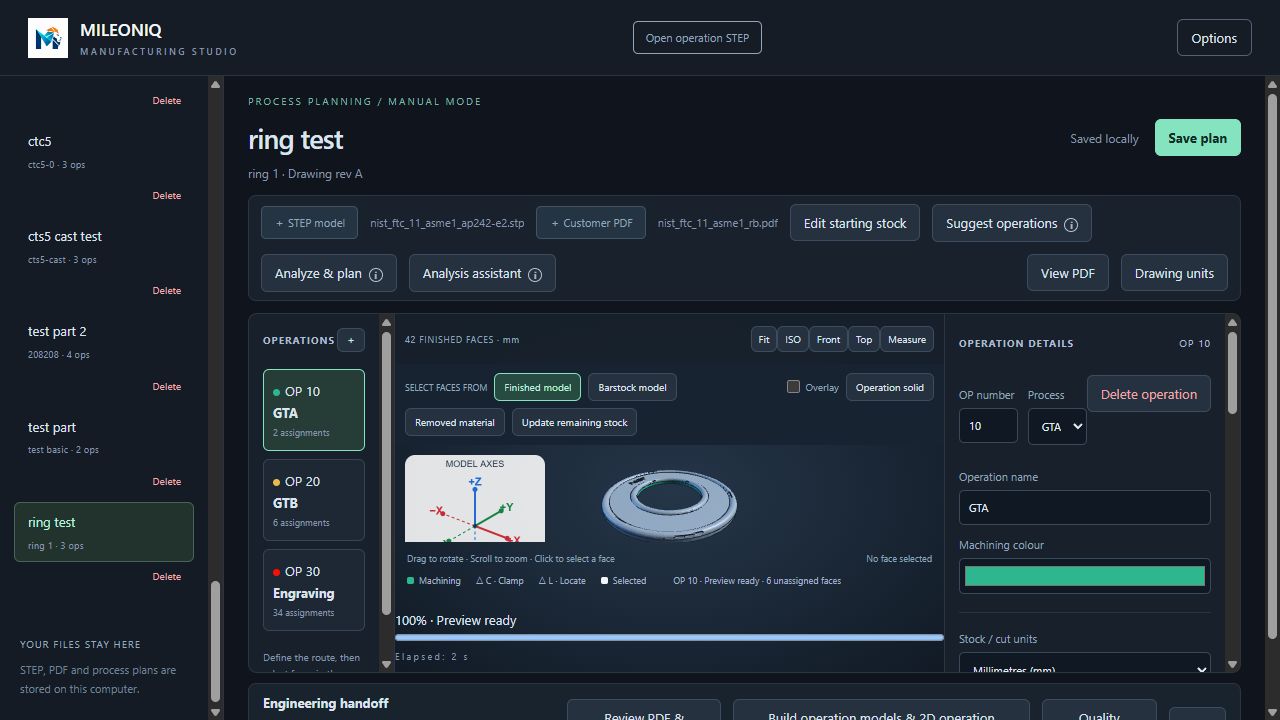
Current MILEONIQ Studio interface showing an example ring, operation list and face assignments
A clearer view of the work ahead.Actual application capture · Development build

WHAT WE DO

From customer requirements
to the shop floor.

MILEONIQ is being developed to connect the customer drawing and STEP model with manufacturing configurations, operational drawings and quality documentation. Carry the requirement forward, operation by operation.

  1. Drawing ballooning
  2. Cast model
  3. 3D configurations
  4. 2D operation drawings
  5. FOD / LOD & run charts
  6. Layouts & control plans
  7. PPAP preparation
01 / CAPTURE THE REQUIREMENT

Drawing ballooning
& feature register

Organize the customer drawing into numbered characteristics and a reviewable feature register. Keep dimensions, tolerances and notes linked to their drawing source alongside the STEP geometry.

Ballooned drawing · Customer feature register

02 / CREATE THE CAST MODEL

Do you need
a cast model?

Working with a complex part, short on time or less experienced in 3D design? Start from your finished STEP model, select the surfaces that need extra material and define the machining allowance in a few clicks. Create a 3D STEP cast-model draft without rebuilding the part from scratch.

Creates machining-allowance geometry. Casting shrinkage, draft angles and foundry process design require separate engineering review.

Selected surfaces · Machining allowances · STEP cast-model draft

03 / BUILD THE PROCESS

Manufacturing process
in 3D configurations

Define the operation sequence, starting stock and face assignments. Prepare operation-based 3D stages and configured models to review how the part progresses through manufacturing.

Operation stages · Configured 3D model

04 / COMMUNICATE THE OPERATION

2D shop-floor
operation drawings

Prepare draft operational drawings linked to the manufacturing stages, with relevant views, dimensions and setup references. Review unresolved items before releasing instructions to the shop floor.

Operational drawings · Drawing review items

05 / SUPPORT THE OPERATOR

FOD, LOD
& operator run charts

Carry reviewed operation characteristics into FOD and LOD inspection forms and operator run charts. Organize measurement methods, readings and offsets around the selected operation.

FOD / LOD forms · Operation run charts

06 / CONNECT THE QUALITY RECORD

Dimensional layouts
& control-plan support

Prepare layout sheets around the ballooned customer requirements and connect operation characteristics to control-plan documentation. Actual readings and inspection decisions remain with your team.

Customer dimensional layout · Master Control Plan

07 / PREPARE THE SUBMISSION

PPAP submission
preparation support

Organize process-flow, PFMEA, control-plan and dimensional documentation into a structured PPAP package. Use a checklist to review the required evidence and select what to submit to your customer.

PPAP folders · Editable forms · Submission checklist

Engineering review is part of the workflow.

Development preview: release scope is still being validated. Customer acceptance limits come from the drawing, not the STEP model. Inspection results, capability studies and approvals must come from verified evidence; document preparation does not constitute PPAP approval.

SEE MILEONIQ IN ACTION

Request a demo.

Want to see how MILEONIQ could fit your manufacturing workflow? Email us to discuss a demo.

Tell us about your team, the software you use and the workflow you would like to explore.

Email us for a demoinfo@mileoniq.com

LICENSING

Choose your subscription.
When we launch.

MILEONIQ Manufacturing Studio

Monthly or annual.

Compare billing options here when subscriptions become available. Final pricing, included modules and renewal terms will be published before purchase.

Pricing to be announced

Monthly subscription details will be published at launch.

No payment is taken. Checkout is not open yet.

DESKTOP APPLICATION

Built for your
engineering workstation.

The public installer is not available yet. Release details, installation instructions and system requirements will be published here when the distribution package is ready.

Platform
Windows
Public installer
Not yet released
License activation
Available with the commercial release
CAD integrations
Requirements depend on the selected workflow

BEFORE YOU START

A few useful details.

Does MILEONIQ replace engineering approval?

No. Outputs require qualified engineering review. Draft geometry and documents are not a guarantee of manufacturability, tool access or production readiness.

Are all modules commercially available?

No. Process Planner is in beta, and quality-document workflows continue to develop. Final release scope and supported integrations will be listed before purchase.

BUILT WITH YOUR INPUT

Help shape
MILEONIQ.

Tell us about your manufacturing workflow and what you would like us to build next.

8 short questions. No account needed.
Your email is optional. Your feedback stays private.

Loading the survey…

LET’S TALK MANUFACTURING

Start with your workflow.

Product questions, licensing enquiries and technical support.

Based in Canada. Building manufacturing software for teams worldwide.

GENERAL ENQUIRIESinfo@mileoniq.com

Share your workflow, ask a question or get in touch about early testing.

MILEONIQ